
Overview:
Our app syncs customers from Shopify to QuickBooks Online along with orders. During the setup process, you can choose how customers should be created and mapped in QuickBooks based on your business needs.
If you are already using our app with a different customer mapping option, please let us know if you would like us to update the customer mapping settings for you as per the option below.
If you are using Shopify B2B features and want to match the B2B Company name with the QuickBooks Display Name, you can choose the customer mapping option shown in the image below:
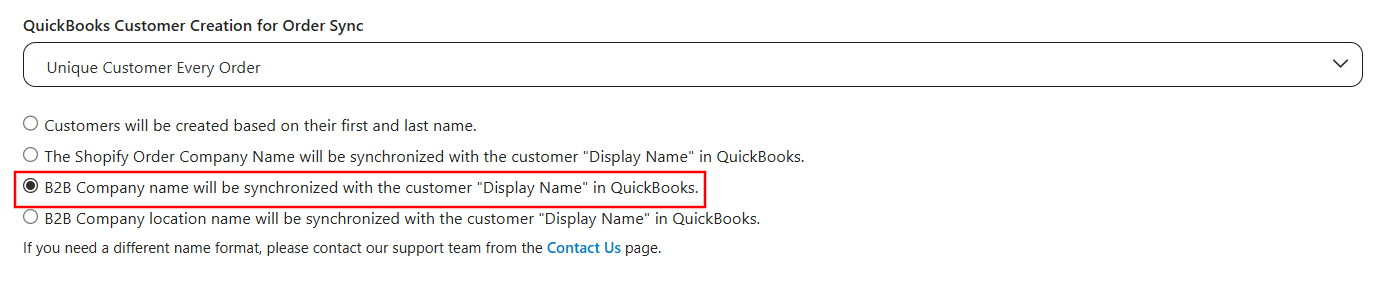
Option 3: Map Customers by B2B Company Name
With this option, the B2B company name from the Shopify order is synchronized with the Customer Display Name in QuickBooks.
This method is ideal for businesses that primarily deal with B2B customers and want to maintain consistency using company names rather than individual customer names.
How It Works
When an order is synced from Shopify to QuickBooks:
-
The company name provided in the Shopify order is used for mapping.
-
The app checks if a customer with the same display name already exists in QuickBooks.
If a match is found:
-
The existing QuickBooks customer is linked to the order.
If no match is not found:
-
A new customer is created in QuickBooks using the company name as the display name.
Example
-
Shopify order company name: Home Medical Supplies, Inc

Scenario 1:
If a customer with the display name Home Medical Supplies, Inc already exists in QuickBooks:
→ That existing customer will be mapped to the order.
Scenario 2:
If no such customer exists in QuickBooks:
→ A new customer will be created with the display name Home Medical Supplies, Inc.
Important Notes
-
The mapping is exact-match based, so the company name must match precisely.
-
Once a mapping is established, it is saved in the app and used for future orders.